উৎস-পৰীক্ষিত সম্পূৰ্ণ প্ৰসংগ হাতপুথি

AccessiMind+ (২০২৬/১০-১১৫ · ১৬২১৬৫৪) ব্যৱহাৰকাৰী সহায়ক

ছেটআপৰ বাবে সম্পূৰ্ণ স্তৰ-দ্বাৰা-স্তৰ আলেখ্যন, 6-টেব সংহতিসমূহ স্থাপত্য, 1–5 আঙুলিৰ ফ্ৰীফৰ্ম ইংগিত, 6-চেনেল TTS অডিঅ' ৰাউটিং, AI উইজাৰ্ড এজেন্ট, 6-ম'ড ইউনিফাইড অনুবাদ হাব, 31-ভাষাৰ স্মাৰ্ট ডিক্টেচন, কল ব্যৱস্থাপনা, অভিগমযোগ্য কিবৰ্ড, আৰু ৱেব ব্ৰাউজাৰ।

২০২৬/১০-১১৫ স্ক্ৰীণ ৱাকথ্ৰু ভিডিঅ’ গাইড · অসমীয়া (Assamese)

AccessiMind+ পৰ্দাসমূহ, 6-টেব আন্তঃপৃষ্ঠ আৰু 12 টা অধ্যায়ত প্ৰতিটো বৈশিষ্ট্য

AccessiMind+ 2026/10-116 (সাধাৰণ, UI কাষ্টমাইজেচন, TTS আউটপুট চেনেল, ইংগিত, ফ্ৰীফৰ্ম ইংগিত সৃষ্টিকৰ্তা, অটো লেবেলিং, উন্নত, কল ব্যৱস্থাপনা, AI সহায়ক, বক্তৃতা অনুবাদ, স্মাৰ্ট ডিক্টেচন, আৰু অভিগমযোগ্য কিবৰ্ড/ব্ৰ'জাৰ)ৰ পৰা ধৰা প্ৰকৃত Android পৰ্দা বৈশিষ্ট্যযুক্ত স্ক্ৰীণ-বাই-স্ক্ৰীণ ৱাকথ্ৰু বৰ্ণিত আৰু কেপচনযুক্ত।

01:19 · 12 Chapters · AS

যিকোনো অধ্যায় নিৰ্বাচন কৰিলে ভিডিঅ'টো সেই পৰ্দাৰ ৱাকথ্ৰুলৈ পোনপটীয়াকৈ জঁপিয়াই পৰে। কেপচন আৰু সম্পূৰ্ণ ডাউনলোড কৰিব পৰা ট্ৰান্সক্ৰিপ্ট দিয়া হৈছে।

প্ৰডাকচন মুক্তি • ২০ অক্টোবৰ ২০২৬ • সংস্কৰণ ২০২৬/১০-১১৫ (versionCode: 1621660)

AccessiMind+ 2026/10-116 (1621660): পুনৰ নিৰ্মাণ কৰা কোৰ, 6-টেব আন্তঃপৃষ্ঠ আৰু 101-স্থানীয় সমৰ্থন

হাইব্ৰিড ডুৱেল-ডিএক্স আৰ্কিটেকচাৰ, ৪-স্তৰীয় এটমিক ছেটিংছ সংৰক্ষণ (ডাইৰেক্ট বুট), ৬-চেনেল টিটিএছ আউটপুট ষ্ট্ৰিম মেনেজাৰ, ১০১-স্থানীয় বন্ধ/আদৰণি ঘোষণা, আৰু তৃতীয়-পক্ষৰ অৱস্থান এছডিকেৰ পৰা মুক্ত ১০০% স্থানীয় এণ্ড্ৰইড সুৰক্ষা।

6-টেব আধুনিক হোম স্ক্ৰীণ আৰু তৎক্ষণাত ভয়েচ/টেক্সট সন্ধান

ছটা সংগঠিত টেবৰ পৰা প্ৰতিটো ছেটিংছত উপনীত হওক: সাধাৰণ, ইংগিত, বিষয়বস্তুৰ বক্তৃতা, উন্নত, কৃত্ৰিম বুদ্ধিমত্তা, আৰু অতিৰিক্ত সংহতিসমূহ। ওপৰৰ সন্ধান বাৰ বা ভয়েচ সন্ধান ব্যৱহাৰ কৰি যিকোনো বিকল্প তৎক্ষণাত ফিল্টাৰ কৰক।
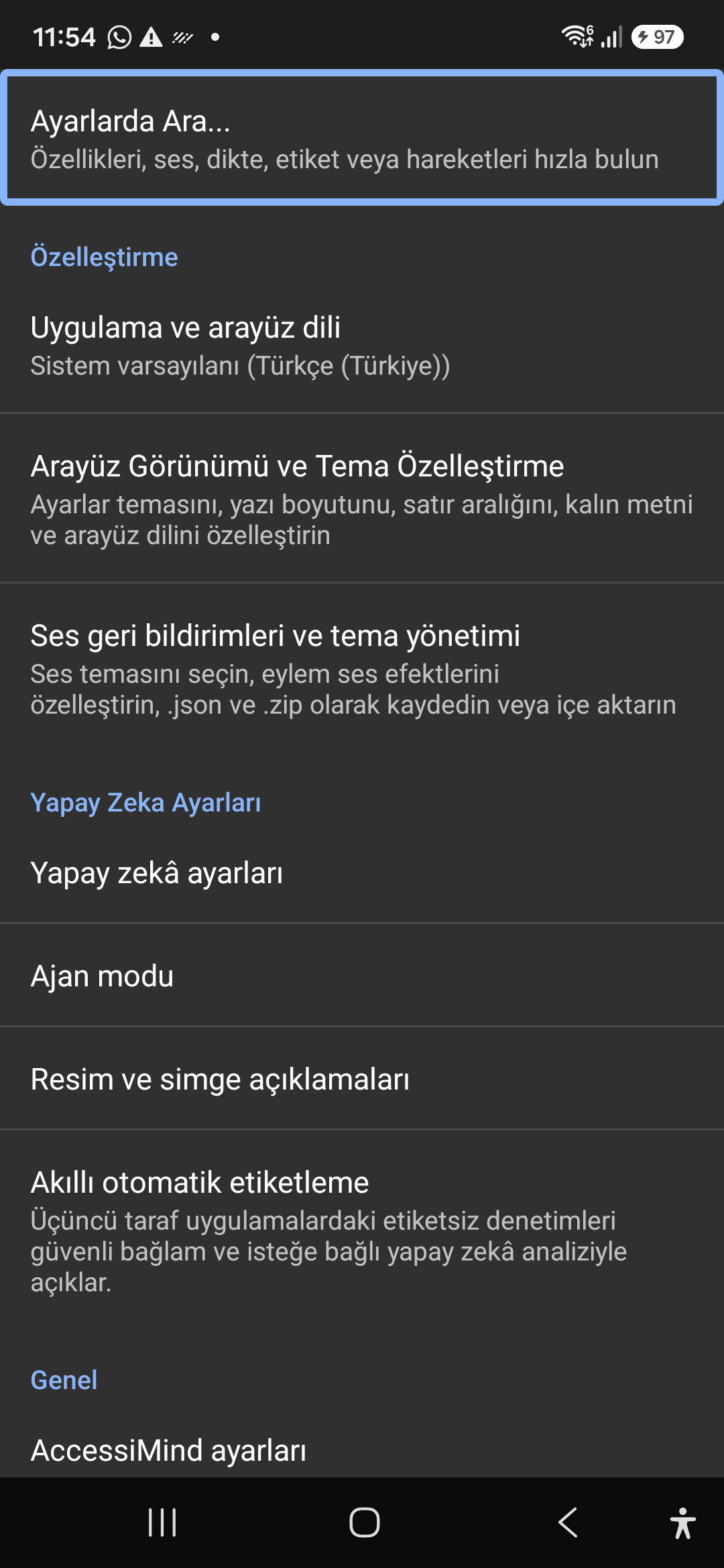
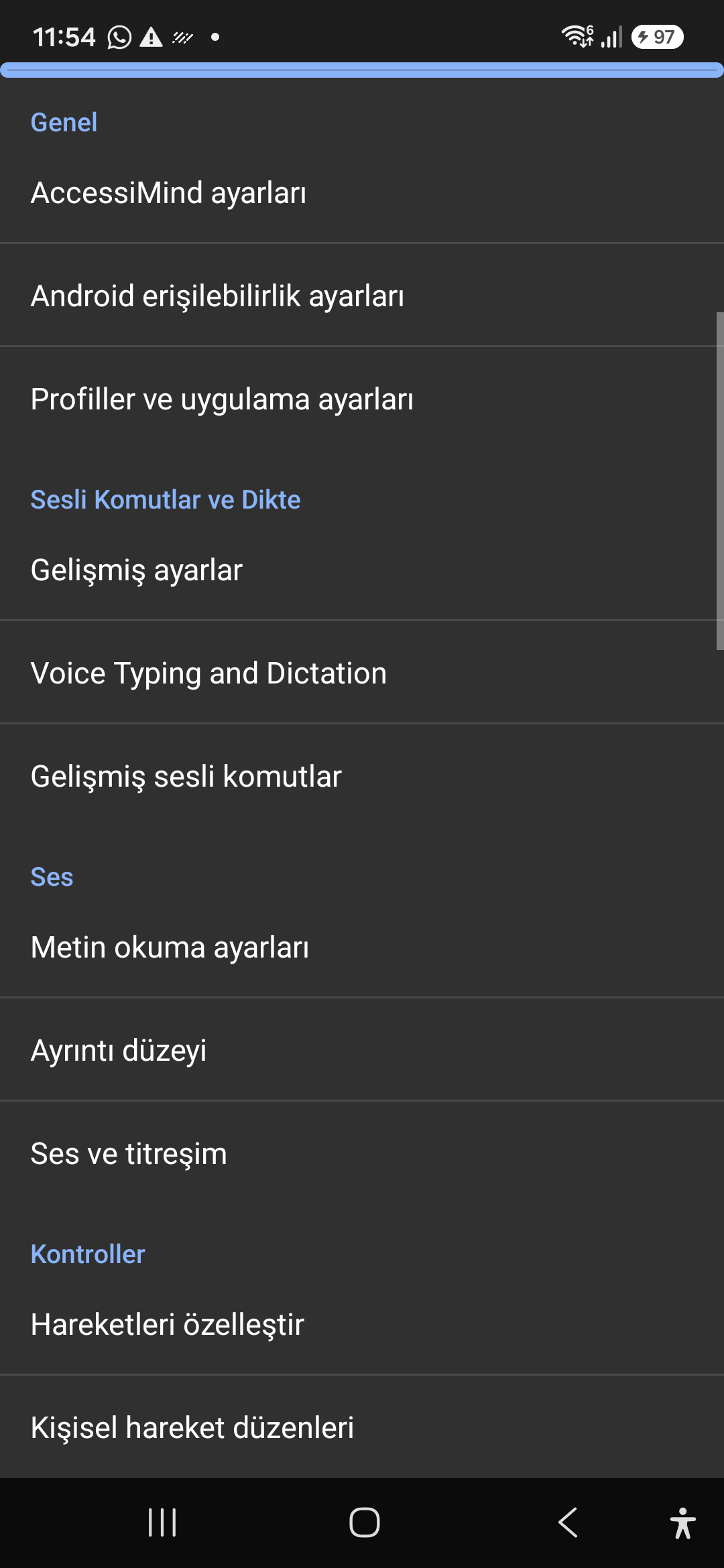
AI সহায়ক, উইজাৰ্ড এজেন্ট আৰু মাল্টি-স্ক্রিপ্ট অফলাইন OCR

Gemini, OpenAI/Codex, বা অফলাইন Gemma-4 E2B ৰ সৈতে পৰ্দা আৰু ছবিসমূহ বৰ্ণনা কৰক, ভয়েচৰ দ্বাৰা বহু-পদক্ষেপ উইজাৰ্ড এজেন্ট কাৰ্য্যসমূহ এক্সিকিউট কৰক, আৰু অফলাইন ONNX + Google ML Kit OCR ৰ সৈতে স্ক্ৰিপ্টসমূহৰ মাজেৰে লিখনী চিনাক্ত কৰক।

ইউনিফাইড ট্ৰেন্সলেচন হাব (৬ মোড) আৰু ৩১-ভাষা স্মাৰ্ট ডিক্টেচন

স্বয়ংক্ৰিয়ভাৱে ধৰা পেলোৱা ফ'কাচ, অবিৰত নেভিগেচন, ছবি OCR, সম্পূৰ্ণ পৰ্দা, ক্লিপবোৰ্ড, আৰু লাইভ স্পিচ অনুবাদ। বিৰাম চিহ্ন-সচেতন স্মাৰ্ট ডিক্টেচন আৰু ৩১টা ভাষাত কাষ্টম ভয়েচ কমাণ্ড।

১–৫ আঙুলিৰ ইংগিত সৃষ্টিকৰ্তা আৰু ১০১-স্থানীয় বন্ধ কৰা বক্তৃতা

ফ্ৰীফৰ্ম 1–5 আঙুলিৰ স্বনিৰ্বাচিত ইংগিত আৰু আমদানি/ৰপ্তানি পৰিকল্পনাসমূহ JSON হিচাপে অংকন কৰক। আপোনাৰ ব্যৱস্থাপ্ৰণালীৰ ভাষাত নিৰ্ভৰযোগ্য কথিত ঘোষণাসমূহ শুনিব যেতিয়াই পৰ্দা পাঠকে 101 টা স্থানীয় সংহতিসমূহৰ মাজেৰে অন বা বন্ধ কৰে।

৬-চেনেল টিটিএছ ষ্ট্ৰিম মেনেজাৰ আৰু একক-টেপ ইন-কল ডায়েলপেড

অভিগম্যতা, মাধ্যম, অধিসূচনা, এলাৰ্ম, ৰিংটোন, বা ভয়েচ কল চেনেলসমূহৰ যোগেদি স্বতন্ত্ৰভাৱে বাক্য ৰুট কৰক। 1-ফিংগাৰ চুইপ, অটো-স্পীকাৰফোন, আৰু একক-টেপ ডায়েলপেড কি'ৰ সৈতে কলৰ উত্তৰ/সমাপ্ত কৰা।

4-স্তৰৰ পাৰমাণৱিক ছেটিংছ সংৰক্ষণ আৰু স্থানীয় অৱস্থান

ডাইৰেক্ট বুট লক পৰ্দাসমূহ আৰু 4-স্তৰৰ এটমিক JSON স্নেপশ্বটসমূহৰ যোগেদি এপ আপডেটসমূহৰ মাজেৰে শূন্য ছেটিংছ হেৰুৱা, লগতে স্থানীয় Android LocationManager + Geocoder অৱস্থান ঘোষণাসমূহ।

02 / 12 · Settings > Customization > App Language / Appearance

2. Interface Customization & System Locale Integration

এই স্ক্ৰীণ ৱাকথ্ৰু ভিডিঅ'টোত চাওক (00:07 - 00:14)

Customizable appearance with high contrast modes, large text rendering, card borders, and independent language selection.

২০২৬/১০-১১৫ স্ক্ৰীণ ৱাকথ্ৰু ভিডিঅ’ গাইড (00:07 - 00:14)

Lock the interface language to system default or independently select from 30 supported languages. WCAG 2.2 compliant dark/light themes and custom font scales.

Screenshot showing customization options for language and theme appearance.

2. Interface Customization & System Locale Integration — Settings > Customization > App Language / Appearance
Settings > Customization > App Language / Appearance
03 / 12 · Settings > Customization > Sound Feedback & Themes

3. Audio Feedback & Sound Theme Management

এই স্ক্ৰীণ ৱাকথ্ৰু ভিডিঅ'টোত চাওক (00:14 - 00:18)

Configure feedback sounds for focus changes, clicks, and notifications. Easily import community-crafted sound packages via .zip or .json.

২০২৬/১০-১১৫ স্ক্ৰীণ ৱাকথ্ৰু ভিডিঅ’ গাইড (00:14 - 00:18)

Customize action audio effects, choose built-in sound themes, or import/export external WAV and OGG sound packages.

Screenshot showing sound feedback and theme configuration.

3. Audio Feedback & Sound Theme Management — Settings > Customization > Sound Feedback & Themes
Settings > Customization > Sound Feedback & Themes
04 / 12 · Settings > AI Settings > Agent Mode

4. Dedicated AI Architecture & Autonomous Agent Mode

এই স্ক্ৰীণ ৱাকথ্ৰু ভিডিঅ'টোত চাওক (00:18 - 00:23)

Agent Mode interprets onscreen context and coordinates complex tasks such as form completion, order placement, or message drafts with interactive safety overlays.

২০২৬/১০-১১৫ স্ক্ৰীণ ৱাকথ্ৰু ভিডিঅ’ গাইড (00:18 - 00:23)

Multi-provider AI architecture integrating Google Gemini 2.5, on-device Gemma, and GPT. Autonomous Agent Mode carries out multi-step tasks with user approval.

Screenshot displaying AI Settings and Agent Mode controls.

4. Dedicated AI Architecture & Autonomous Agent Mode — Settings > AI Settings > Agent Mode
Settings > AI Settings > Agent Mode
05 / 12 · Settings > AI Settings > Image Descriptions / Auto-Labeling

5. Image, Icon Descriptions & Smart Automatic Labeling

এই স্ক্ৰীণ ৱাকথ্ৰু ভিডিঅ'টোত চাওক (00:23 - 00:27)

Visual accessibility enabled by cloud and on-device vision models. Once labeled, buttons and icons are cached locally to minimize network latency.

২০২৬/১০-১১৫ স্ক্ৰীণ ৱাকথ্ৰু ভিডিঅ’ গাইড (00:23 - 00:27)

Narrate images and OCR text within seconds. Recognize unlabeled controls in third-party apps and cache them in local SQLite storage.

Screenshot illustrating image narration and automatic labeling options.

5. Image, Icon Descriptions & Smart Automatic Labeling — Settings > AI Settings > Image Descriptions / Auto-Labeling
Settings > AI Settings > Image Descriptions / Auto-Labeling
06 / 12 · Settings > General > Voice Typing and Dictation

6. General Settings, Voice Typing & Dictation

এই স্ক্ৰীণ ৱাকথ্ৰু ভিডিঅ'টোত চাওক (00:27 - 00:33)

Control the screen reader using voice commands and dictate text into any input field with high recognition accuracy.

২০২৬/১০-১১৫ স্ক্ৰীণ ৱাকথ্ৰু ভিডিঅ’ গাইড (00:27 - 00:33)

Hands-free voice typing, custom voice commands, and core AccessiMind operational parameters.

Screenshot showing general settings and voice typing dictation.

6. General Settings, Voice Typing & Dictation — Settings > General > Voice Typing and Dictation
Settings > General > Voice Typing and Dictation
07 / 12 · Settings > Audio > Text-to-Speech / Verbosity

7. Text-to-Speech (TTS), Verbosity & Audio Channels

এই স্ক্ৰীণ ৱাকথ্ৰু ভিডিঅ'টোত চাওক (00:33 - 00:40)

Fine-tune speech output parameters, manage punctuation and character-by-character pronunciation, and route audio across dedicated streams.

২০২৬/১০-১১৫ স্ক্ৰীণ ৱাকথ্ৰু ভিডিঅ’ গাইড (00:33 - 00:40)

TTS engine selection, speech rate, pitch, 6 independent audio output channels, and granular verbosity controls.

Screenshot showing text-to-speech engine and verbosity preferences.

7. Text-to-Speech (TTS), Verbosity & Audio Channels — Settings > Audio > Text-to-Speech / Verbosity
Settings > Audio > Text-to-Speech / Verbosity
08 / 12 · Settings > Controls > Customize Gestures / Gesture Layouts

8. Controls: Gesture Customization & Custom Layouts

এই স্ক্ৰীণ ৱাকথ্ৰু ভিডিঅ'টোত চাওক (00:40 - 00:46)

Freely remap single and multi-finger taps, swipes, and multi-directional gestures to navigation, reading, or custom actions.

২০২৬/১০-১১৫ স্ক্ৰীণ ৱাকথ্ৰু ভিডিঅ’ গাইড (00:40 - 00:46)

Assign any action to 1 to 5 finger gestures, define independent JSON gesture layouts, and create app profiles.

Screenshot showing gesture customization and custom layout options.

8. Controls: Gesture Customization & Custom Layouts — Settings > Controls > Customize Gestures / Gesture Layouts
Settings > Controls > Customize Gestures / Gesture Layouts
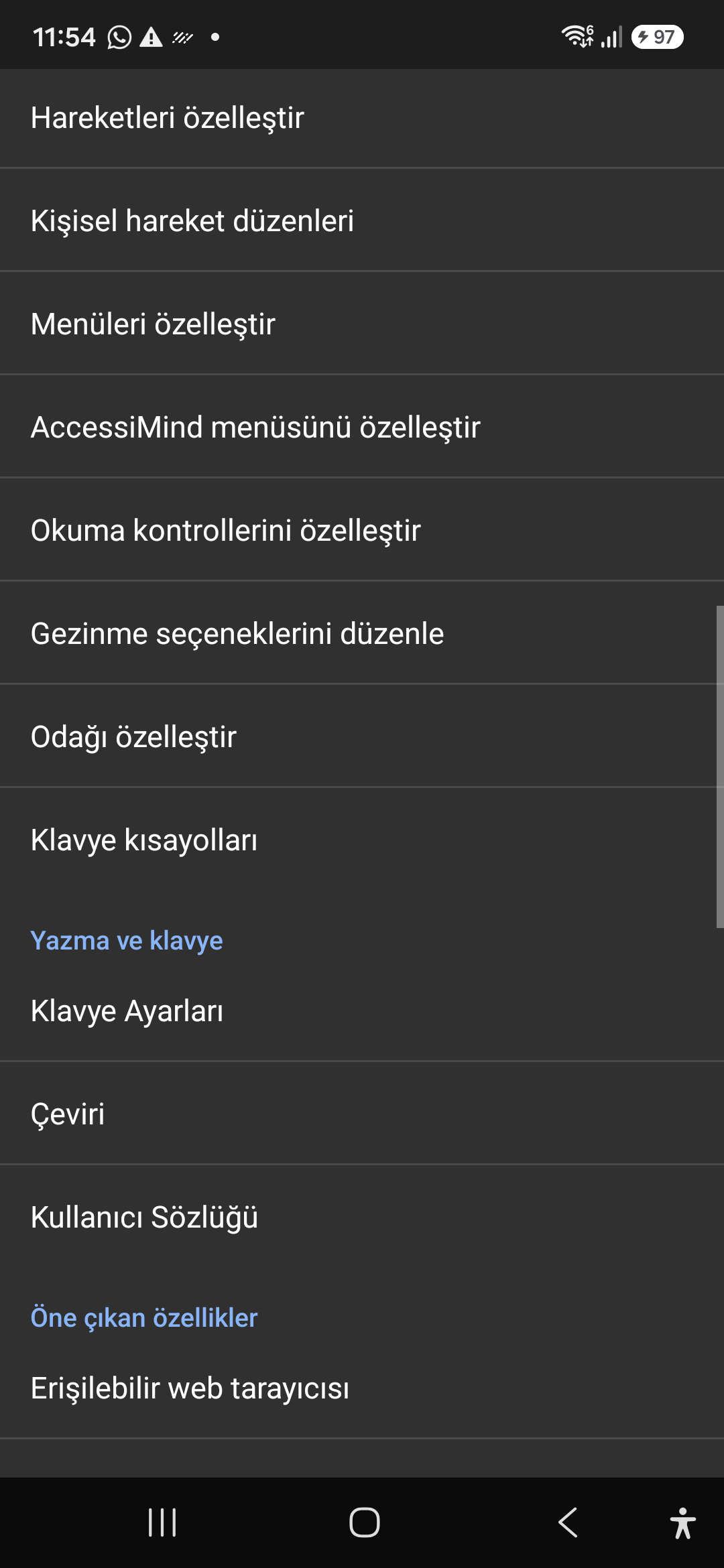
09 / 12 · Settings > Controls > Customize Menus / Navigation Options

9. Customize Menus, Reading Controls & Navigation

এই স্ক্ৰীণ ৱাকথ্ৰু ভিডিঅ'টোত চাওক (00:46 - 00:51)

Personalize the items appearing in the global context menu and reading granularity selector to match your personal workflow.

২০২৬/১০-১১৫ স্ক্ৰীণ ৱাকথ্ৰু ভিডিঅ’ গাইড (00:46 - 00:51)

Tailor the AccessiMind menu, reading controls (rotor), navigation granularities, focus indicator, and keyboard shortcuts.

Screenshot showing menu customization and navigation granularities.

9. Customize Menus, Reading Controls & Navigation — Settings > Controls > Customize Menus / Navigation Options
Settings > Controls > Customize Menus / Navigation Options
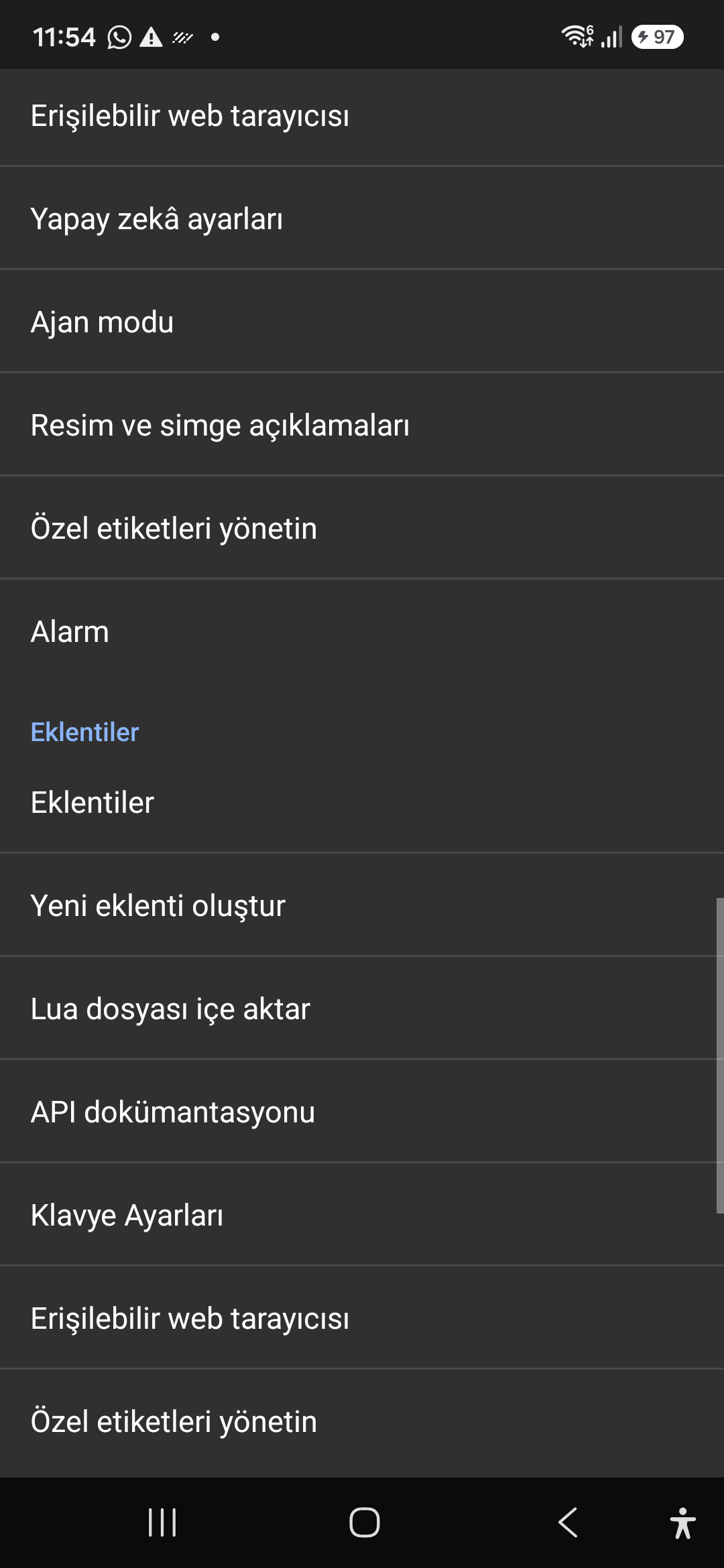
10 / 12 · Settings > Plugins > Create Plugin / Import Lua / API Docs

10. Plugins Engine & Sandboxed Lua Execution

এই স্ক্ৰীণ ৱাকথ্ৰু ভিডিঅ'টোত চাওক (00:51 - 00:58)

Author and run custom Lua scripts securely. Fully documented access to accessibility, speech, UI, HTTP, and local storage APIs.

২০২৬/১০-১১৫ স্ক্ৰীণ ৱাকথ্ৰু ভিডিঅ’ গাইড (00:51 - 00:58)

Sandboxed Lua scripting execution in an isolated Android process, on-device code editing, and comprehensive built-in API documentation.

Screenshot showing plugins hub and API documentation.

10. Plugins Engine & Sandboxed Lua Execution — Settings > Plugins > Create Plugin / Import Lua / API Docs
Settings > Plugins > Create Plugin / Import Lua / API Docs
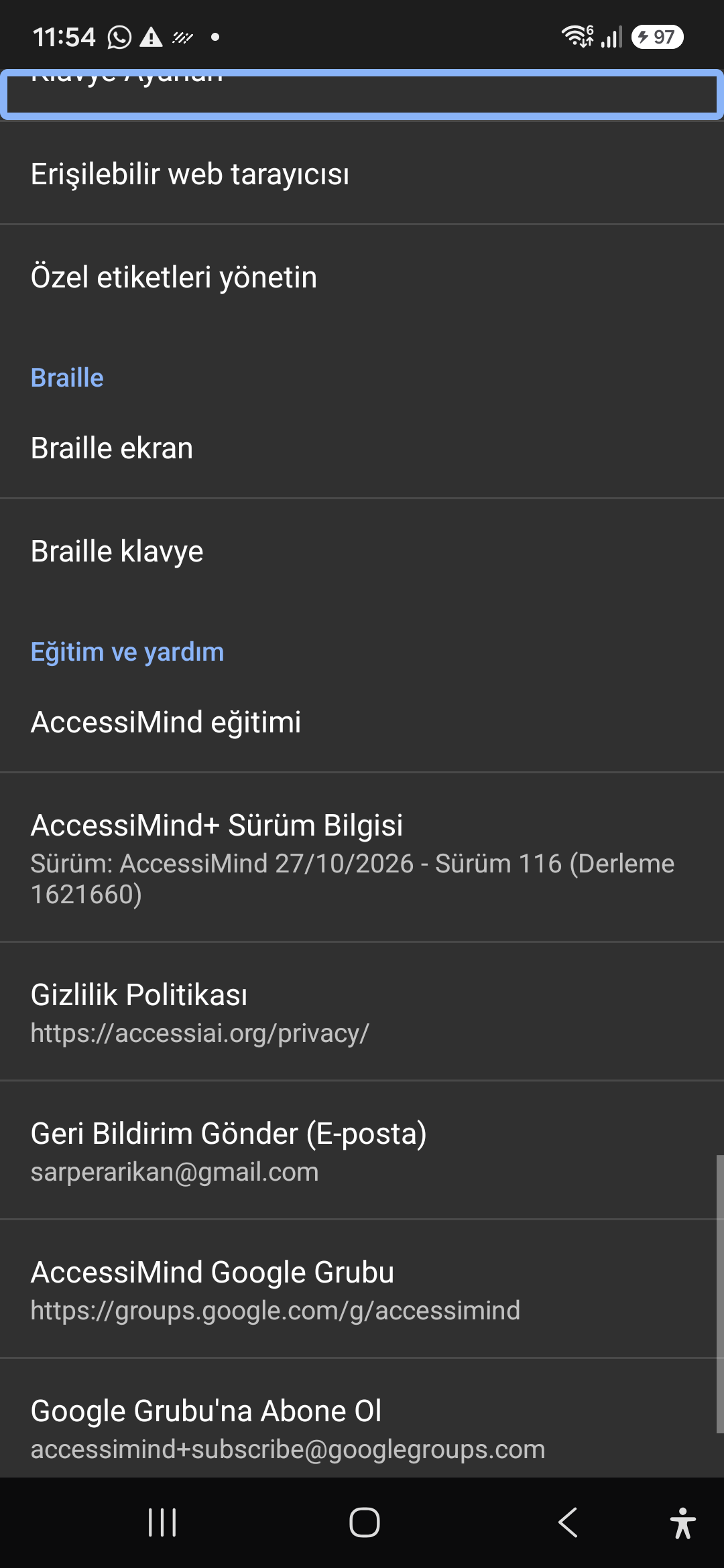
11 / 12 · Settings > Plugins and Tools > Keyboard / Browser / Custom Labels

11. Integrated Tools: Keyboard, Browser & Label Manager

এই স্ক্ৰীণ ৱাকথ্ৰু ভিডিঅ'টোত চাওক (00:58 - 01:05)

A suite of integrated utility tools designed specifically for screen reader users, including accessible web browsing and label backup.

২০২৬/১০-১১৫ স্ক্ৰীণ ৱাকথ্ৰু ভিডিঅ’ গাইড (00:58 - 01:05)

AccessiMind Keyboard preferences, accessible built-in web browser, and management of user-defined labels.

Screenshot displaying keyboard settings, accessible browser, and label manager.

11. Integrated Tools: Keyboard, Browser & Label Manager — Settings > Plugins and Tools > Keyboard / Browser / Custom Labels
Settings > Plugins and Tools > Keyboard / Browser / Custom Labels
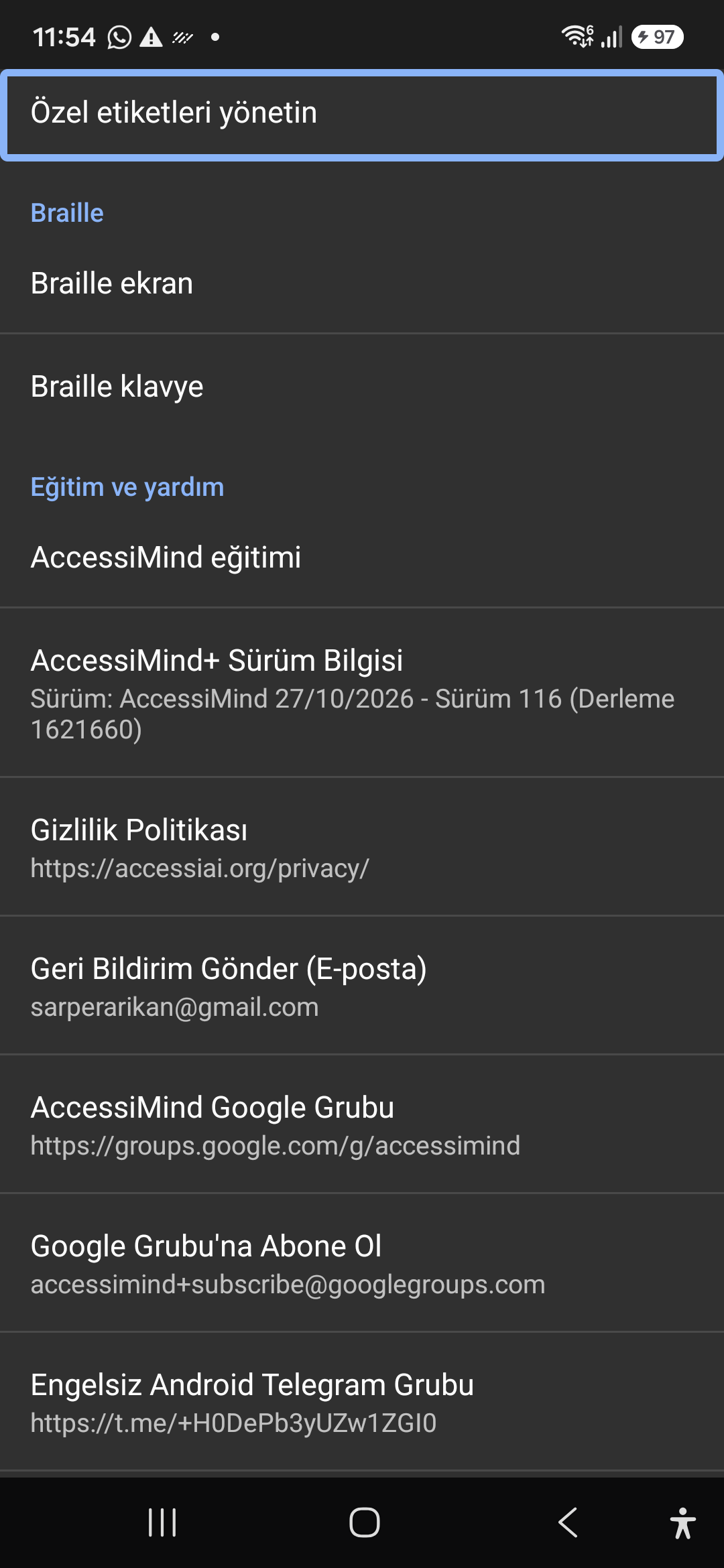
12 / 12 · Settings > Braille / Help & Support > Release 116 Info / Community

12. Braille Support, Release 116 Info & Community Channels

এই স্ক্ৰীণ ৱাকথ্ৰু ভিডিঅ'টোত চাওক (01:05 - 01:19)

Connect refreshable Braille displays via Bluetooth or USB. Access Release 116 verification certificates, privacy terms, and direct Telegram/Google Groups.

২০২৬/১০-১১৫ স্ক্ৰীণ ৱাকথ্ৰু ভিডিঅ’ গাইড (01:05 - 01:19)

Braille display and on-screen keyboard support; Release 116 (Build 1621660) metadata, Privacy Policy, Feedback, and active community groups.

Screenshot showing Braille settings, Release 116 version info, and community channels.

12. Braille Support, Release 116 Info & Community Channels — Settings > Braille / Help & Support > Release 116 Info / Community
Settings > Braille / Help & Support > Release 116 Info / Community