উৎস-যাচাইকৃত সম্পূর্ণ রেফারেন্স ম্যানুয়াল

AccessiMind+ (2026/10-116 · 1621660) ব্যবহারকারীর নির্দেশিকা

সেটআপের জন্য ধাপে ধাপে ডকুমেন্টেশন সম্পূর্ণ করুন, 6-ট্যাব সেটিংস আর্কিটেকচার, 1-5 আঙ্গুলের ফ্রিফর্ম অঙ্গভঙ্গি, 6-চ্যানেল TTS অডিও রাউটিং, AI উইজার্ড এজেন্ট, 6-মোড ইউনিফাইড ট্রান্সলেশন হাব, 31-ভাষা স্মার্ট ডিকটেশন, কল ম্যানেজমেন্ট, অ্যাক্সেসযোগ্য কীবোর্ড, এবং ওয়েব ব্রো।

2026/10-116 স্ক্রীন ওয়াকথ্রু ভিডিও গাইড · বাংলা (Bengali)

AccessiMind+ স্ক্রীন, 6-ট্যাব ইন্টারফেস এবং 12টি অধ্যায়ে প্রতিটি বৈশিষ্ট্য

AccessiMind+ 2026/10-116 (সাধারণ, UI কাস্টমাইজেশন, টিটিএস আউটপুট চ্যানেল, অঙ্গভঙ্গি, ফ্রিফর্ম জেসচার ক্রিয়েটর, অটো লেবেলিং, অ্যাডভান্সড, কল ম্যানেজমেন্ট, স্মার্ট ট্রান্সসিবল, এআই, অ্যাসিস্ট্যান্ট, অ্যাসিস্ট্যান্ট, অ্যাকসেসিবল, অ্যাসিস্ট্যান্ট, অটো লেবেলিং, অ্যাডভান্সড, অ্যাকসেসিমাইন্ড+ 2026/10-116) থেকে ক্যাপচার করা আসল অ্যান্ড্রয়েড স্ক্রিন সমন্বিত স্ক্রিন-বাই-স্ক্রিন ওয়াকথ্রু। কীবোর্ড/ব্রাউজার)।

01:19 · 12 Chapters · BN

যেকোনো অধ্যায় নির্বাচন করা ভিডিওটিকে সরাসরি সেই স্ক্রিনের ওয়াকথ্রুতে নিয়ে যায়। ক্যাপশন এবং সম্পূর্ণ ডাউনলোডযোগ্য প্রতিলিপি প্রদান করা হয়.

প্রোডাকশন রিলিজ • 20 অক্টোবর 2026 • সংস্করণ 2026/10-116 (সংস্করণ কোড: 1621660)

AccessiMind+ 2026/10-116 (1621660): রিবিল্ট কোর, 6-ট্যাব ইন্টারফেস এবং 101-লোকেল সাপোর্ট

হাইব্রিড ডুয়াল-ডেক্স আর্কিটেকচার, 4-লেয়ার অ্যাটমিক সেটিংস সংরক্ষণ (ডাইরেক্ট বুট), 6-চ্যানেল TTS আউটপুট স্ট্রীম ম্যানেজার, 101-লোকেল শাটডাউন/স্বাগত ঘোষণা এবং 100% নেটিভ অ্যান্ড্রয়েড সিকিউরিটি থার্ড-পার্টি লোকেশন SDK ছাড়া।

6-ট্যাব আধুনিক হোম স্ক্রীন এবং তাত্ক্ষণিক ভয়েস/টেক্সট অনুসন্ধান

ছয়টি সংগঠিত ট্যাব থেকে প্রতিটি সেটিংসে পৌঁছান: সাধারণ, অঙ্গভঙ্গি, বিষয়বস্তু বক্তৃতা, উন্নত, কৃত্রিম বুদ্ধিমত্তা, এবং অতিরিক্ত সেটিংস। শীর্ষ অনুসন্ধান বার বা ভয়েস অনুসন্ধান ব্যবহার করে অবিলম্বে যেকোনো বিকল্প ফিল্টার করুন।
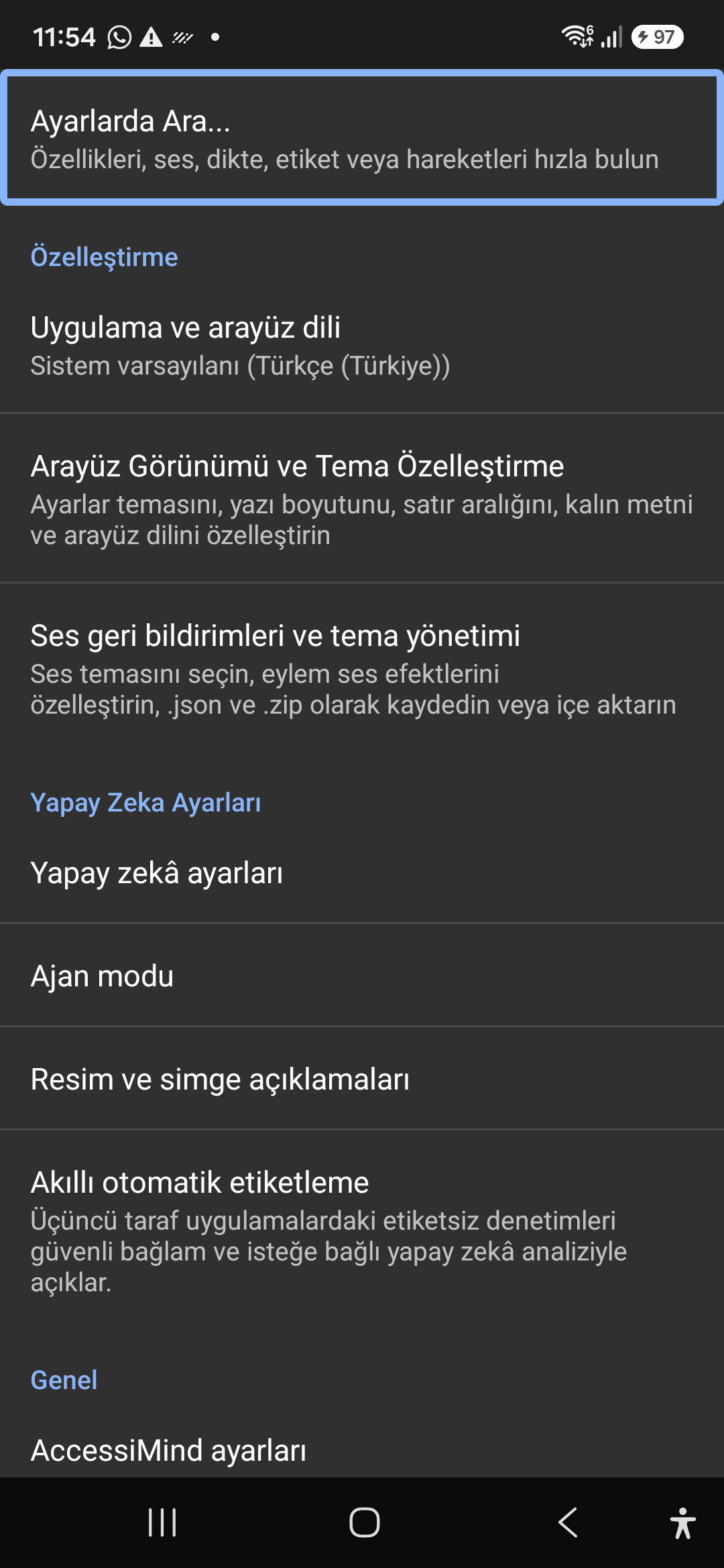
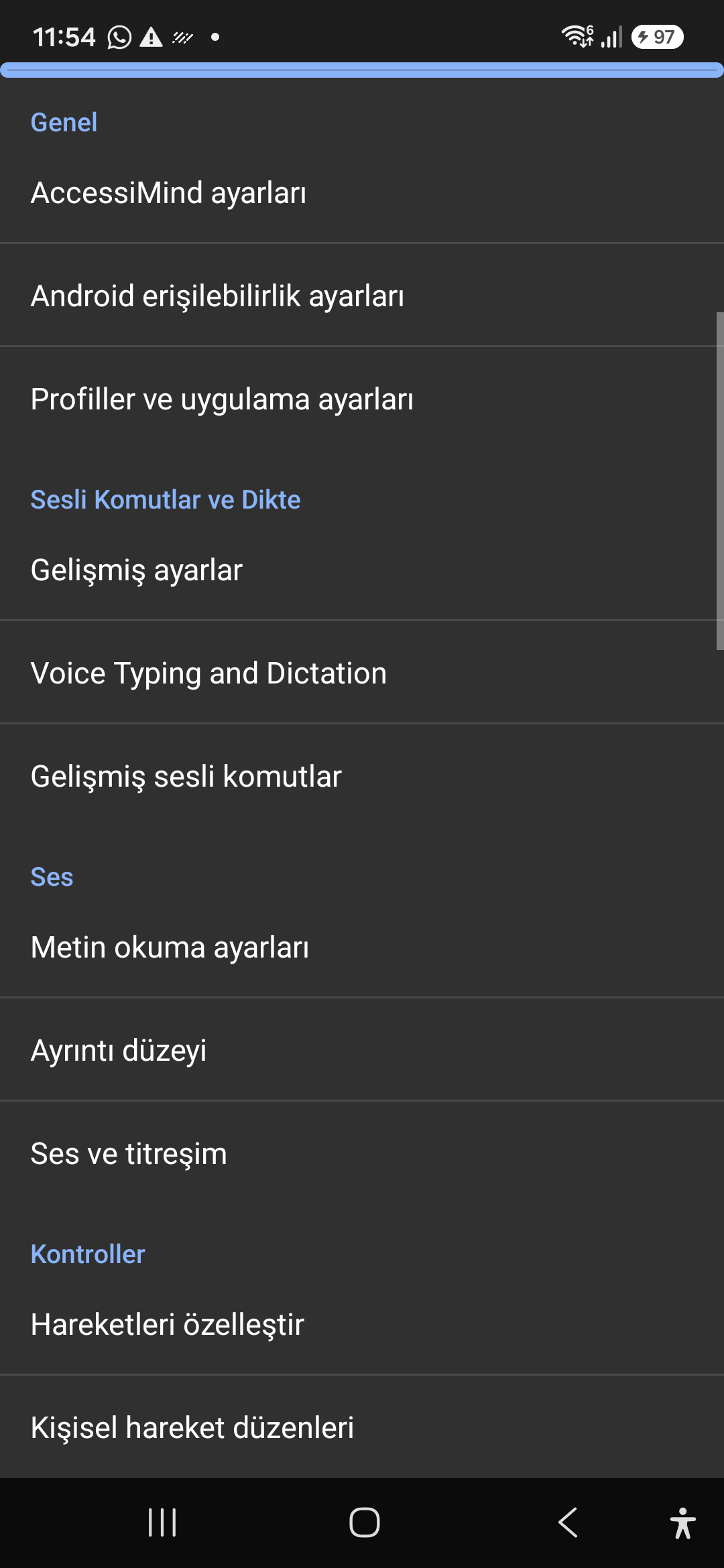
এআই সহকারী, উইজার্ড এজেন্ট এবং মাল্টি-স্ক্রিপ্ট অফলাইন ওসিআর

জেমিনি, OpenAI/Codex, অথবা অফলাইন Gemma-4 E2B সহ স্ক্রীন এবং চিত্রগুলি বর্ণনা করুন, ভয়েসের মাধ্যমে মাল্টি-স্টেপ উইজার্ড এজেন্ট কাজগুলি সম্পাদন করুন এবং অফলাইন ONNX + Google ML Kit OCR সহ স্ক্রিপ্ট জুড়ে পাঠ্য সনাক্ত করুন৷

ইউনিফাইড ট্রান্সলেশন হাব (6 মোড) এবং 31-ভাষা স্মার্ট ডিকটেশন

অটো-ডিটেক্টেড ফোকাস, কন্টিনিউয়াস নেভিগেশন, ইমেজ ওসিআর, ফুল স্ক্রীন, ক্লিপবোর্ড এবং লাইভ স্পিচ অনুবাদ। 31টি ভাষায় যতিচিহ্ন-সচেতন স্মার্ট ডিকটেশন এবং কাস্টম ভয়েস কমান্ড।

1-5 আঙুলের অঙ্গভঙ্গি নির্মাতা এবং 101-স্থানীয় শাটডাউন স্পিচ

ফ্রিফর্ম 1-5 আঙুলের কাস্টম অঙ্গভঙ্গি আঁকুন এবং JSON হিসাবে লেআউট আমদানি/রপ্তানি করুন। যখনই 101টি লোকেল সেট জুড়ে স্ক্রিন রিডার চালু বা বন্ধ হয় তখন আপনার সিস্টেমের ভাষায় নির্ভরযোগ্য কথ্য ঘোষণাগুলি শুনুন।

6-চ্যানেল TTS স্ট্রিম ম্যানেজার এবং একক-ট্যাপ ইন-কল ডায়ালপ্যাড

অ্যাক্সেসিবিলিটি, মিডিয়া, বিজ্ঞপ্তি, অ্যালার্ম, রিংটোন বা ভয়েস কল চ্যানেলের মাধ্যমে স্বাধীনভাবে বক্তৃতা রুট করুন। 1-আঙ্গুলের সোয়াইপ, স্বয়ংক্রিয়-স্পিকারফোন এবং একক-ট্যাপ ডায়ালপ্যাড কীগুলির সাহায্যে উত্তর দিন/শেষ কল করুন৷

4-স্তর পারমাণবিক সেটিংস সংরক্ষণ এবং স্থানীয় অবস্থান

4-লেয়ার অ্যাটমিক JSON স্ন্যাপশটের মাধ্যমে ডাইরেক্ট বুট লক স্ক্রিন এবং অ্যাপ আপডেট জুড়ে শূন্য সেটিংসের ক্ষতি, সাথে নেটিভ অ্যান্ড্রয়েড লোকেশন ম্যানেজার + জিওকোডার অবস্থান ঘোষণা।

02 / 12 · Settings > Customization > App Language / Appearance

2. Interface Customization & System Locale Integration

ভিডিওতে এই স্ক্রিন ওয়াকথ্রু দেখুন (00:07 - 00:14)

Customizable appearance with high contrast modes, large text rendering, card borders, and independent language selection.

2026/10-116 স্ক্রীন ওয়াকথ্রু ভিডিও গাইড (00:07 - 00:14)

Lock the interface language to system default or independently select from 30 supported languages. WCAG 2.2 compliant dark/light themes and custom font scales.

Screenshot showing customization options for language and theme appearance.

2. Interface Customization & System Locale Integration — Settings > Customization > App Language / Appearance
Settings > Customization > App Language / Appearance
03 / 12 · Settings > Customization > Sound Feedback & Themes

3. Audio Feedback & Sound Theme Management

ভিডিওতে এই স্ক্রিন ওয়াকথ্রু দেখুন (00:14 - 00:18)

Configure feedback sounds for focus changes, clicks, and notifications. Easily import community-crafted sound packages via .zip or .json.

2026/10-116 স্ক্রীন ওয়াকথ্রু ভিডিও গাইড (00:14 - 00:18)

Customize action audio effects, choose built-in sound themes, or import/export external WAV and OGG sound packages.

Screenshot showing sound feedback and theme configuration.

3. Audio Feedback & Sound Theme Management — Settings > Customization > Sound Feedback & Themes
Settings > Customization > Sound Feedback & Themes
04 / 12 · Settings > AI Settings > Agent Mode

4. Dedicated AI Architecture & Autonomous Agent Mode

ভিডিওতে এই স্ক্রিন ওয়াকথ্রু দেখুন (00:18 - 00:23)

Agent Mode interprets onscreen context and coordinates complex tasks such as form completion, order placement, or message drafts with interactive safety overlays.

2026/10-116 স্ক্রীন ওয়াকথ্রু ভিডিও গাইড (00:18 - 00:23)

Multi-provider AI architecture integrating Google Gemini 2.5, on-device Gemma, and GPT. Autonomous Agent Mode carries out multi-step tasks with user approval.

Screenshot displaying AI Settings and Agent Mode controls.

4. Dedicated AI Architecture & Autonomous Agent Mode — Settings > AI Settings > Agent Mode
Settings > AI Settings > Agent Mode
05 / 12 · Settings > AI Settings > Image Descriptions / Auto-Labeling

5. Image, Icon Descriptions & Smart Automatic Labeling

ভিডিওতে এই স্ক্রিন ওয়াকথ্রু দেখুন (00:23 - 00:27)

Visual accessibility enabled by cloud and on-device vision models. Once labeled, buttons and icons are cached locally to minimize network latency.

2026/10-116 স্ক্রীন ওয়াকথ্রু ভিডিও গাইড (00:23 - 00:27)

Narrate images and OCR text within seconds. Recognize unlabeled controls in third-party apps and cache them in local SQLite storage.

Screenshot illustrating image narration and automatic labeling options.

5. Image, Icon Descriptions & Smart Automatic Labeling — Settings > AI Settings > Image Descriptions / Auto-Labeling
Settings > AI Settings > Image Descriptions / Auto-Labeling
06 / 12 · Settings > General > Voice Typing and Dictation

6. General Settings, Voice Typing & Dictation

ভিডিওতে এই স্ক্রিন ওয়াকথ্রু দেখুন (00:27 - 00:33)

Control the screen reader using voice commands and dictate text into any input field with high recognition accuracy.

2026/10-116 স্ক্রীন ওয়াকথ্রু ভিডিও গাইড (00:27 - 00:33)

Hands-free voice typing, custom voice commands, and core AccessiMind operational parameters.

Screenshot showing general settings and voice typing dictation.

6. General Settings, Voice Typing & Dictation — Settings > General > Voice Typing and Dictation
Settings > General > Voice Typing and Dictation
07 / 12 · Settings > Audio > Text-to-Speech / Verbosity

7. Text-to-Speech (TTS), Verbosity & Audio Channels

ভিডিওতে এই স্ক্রিন ওয়াকথ্রু দেখুন (00:33 - 00:40)

Fine-tune speech output parameters, manage punctuation and character-by-character pronunciation, and route audio across dedicated streams.

2026/10-116 স্ক্রীন ওয়াকথ্রু ভিডিও গাইড (00:33 - 00:40)

TTS engine selection, speech rate, pitch, 6 independent audio output channels, and granular verbosity controls.

Screenshot showing text-to-speech engine and verbosity preferences.

7. Text-to-Speech (TTS), Verbosity & Audio Channels — Settings > Audio > Text-to-Speech / Verbosity
Settings > Audio > Text-to-Speech / Verbosity
08 / 12 · Settings > Controls > Customize Gestures / Gesture Layouts

8. Controls: Gesture Customization & Custom Layouts

ভিডিওতে এই স্ক্রিন ওয়াকথ্রু দেখুন (00:40 - 00:46)

Freely remap single and multi-finger taps, swipes, and multi-directional gestures to navigation, reading, or custom actions.

2026/10-116 স্ক্রীন ওয়াকথ্রু ভিডিও গাইড (00:40 - 00:46)

Assign any action to 1 to 5 finger gestures, define independent JSON gesture layouts, and create app profiles.

Screenshot showing gesture customization and custom layout options.

8. Controls: Gesture Customization & Custom Layouts — Settings > Controls > Customize Gestures / Gesture Layouts
Settings > Controls > Customize Gestures / Gesture Layouts
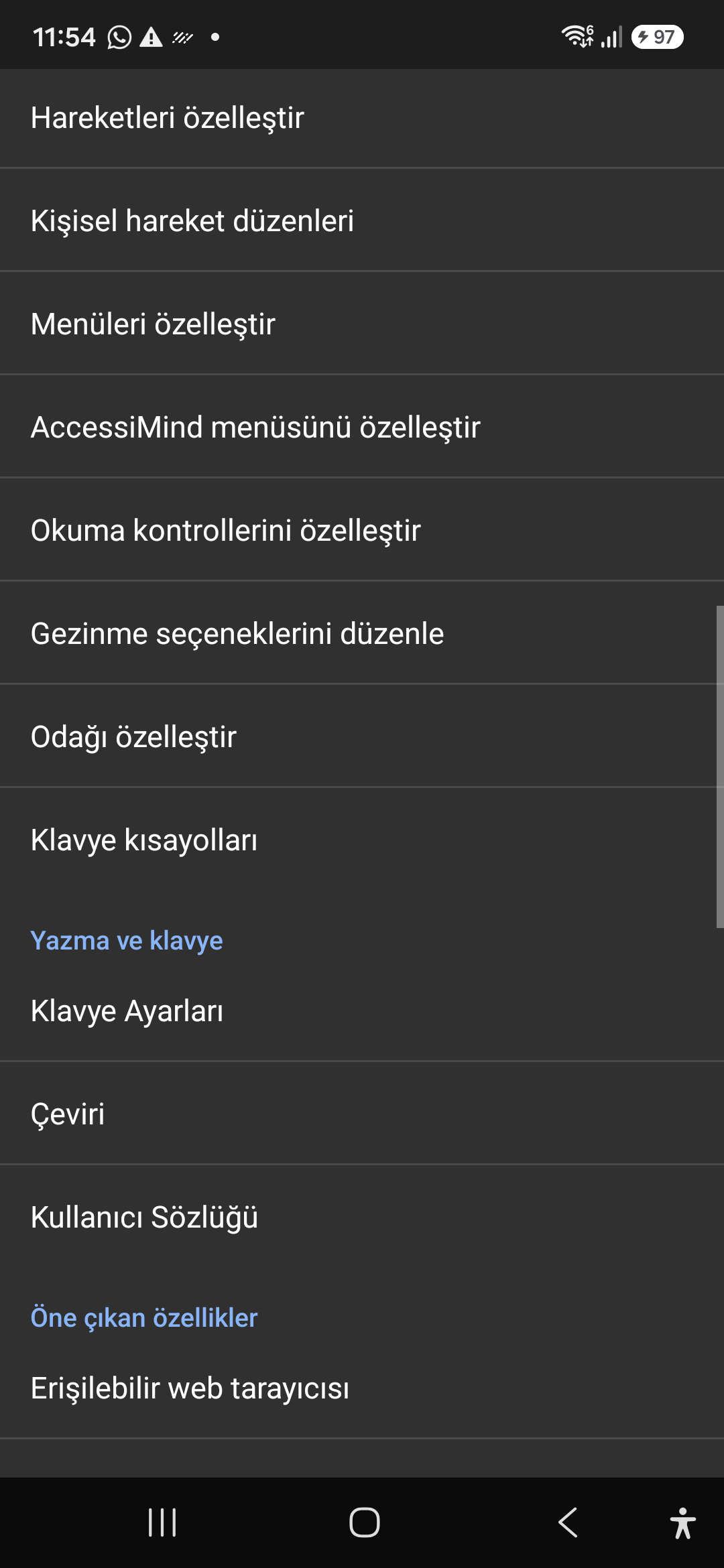
09 / 12 · Settings > Controls > Customize Menus / Navigation Options

9. Customize Menus, Reading Controls & Navigation

ভিডিওতে এই স্ক্রিন ওয়াকথ্রু দেখুন (00:46 - 00:51)

Personalize the items appearing in the global context menu and reading granularity selector to match your personal workflow.

2026/10-116 স্ক্রীন ওয়াকথ্রু ভিডিও গাইড (00:46 - 00:51)

Tailor the AccessiMind menu, reading controls (rotor), navigation granularities, focus indicator, and keyboard shortcuts.

Screenshot showing menu customization and navigation granularities.

9. Customize Menus, Reading Controls & Navigation — Settings > Controls > Customize Menus / Navigation Options
Settings > Controls > Customize Menus / Navigation Options
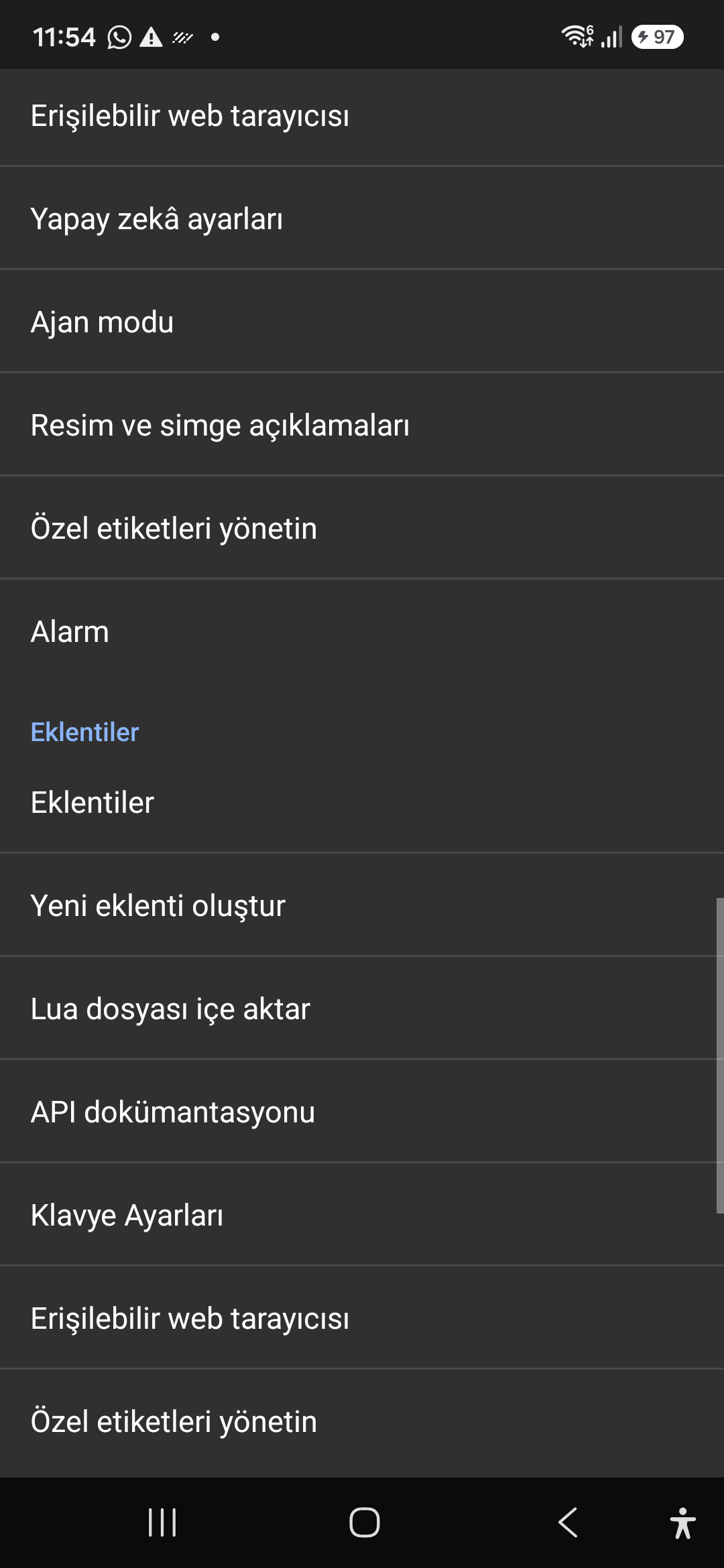
10 / 12 · Settings > Plugins > Create Plugin / Import Lua / API Docs

10. Plugins Engine & Sandboxed Lua Execution

ভিডিওতে এই স্ক্রিন ওয়াকথ্রু দেখুন (00:51 - 00:58)

Author and run custom Lua scripts securely. Fully documented access to accessibility, speech, UI, HTTP, and local storage APIs.

2026/10-116 স্ক্রীন ওয়াকথ্রু ভিডিও গাইড (00:51 - 00:58)

Sandboxed Lua scripting execution in an isolated Android process, on-device code editing, and comprehensive built-in API documentation.

Screenshot showing plugins hub and API documentation.

10. Plugins Engine & Sandboxed Lua Execution — Settings > Plugins > Create Plugin / Import Lua / API Docs
Settings > Plugins > Create Plugin / Import Lua / API Docs
11 / 12 · Settings > Plugins and Tools > Keyboard / Browser / Custom Labels

11. Integrated Tools: Keyboard, Browser & Label Manager

ভিডিওতে এই স্ক্রিন ওয়াকথ্রু দেখুন (00:58 - 01:05)

A suite of integrated utility tools designed specifically for screen reader users, including accessible web browsing and label backup.

2026/10-116 স্ক্রীন ওয়াকথ্রু ভিডিও গাইড (00:58 - 01:05)

AccessiMind Keyboard preferences, accessible built-in web browser, and management of user-defined labels.

Screenshot displaying keyboard settings, accessible browser, and label manager.

11. Integrated Tools: Keyboard, Browser & Label Manager — Settings > Plugins and Tools > Keyboard / Browser / Custom Labels
Settings > Plugins and Tools > Keyboard / Browser / Custom Labels
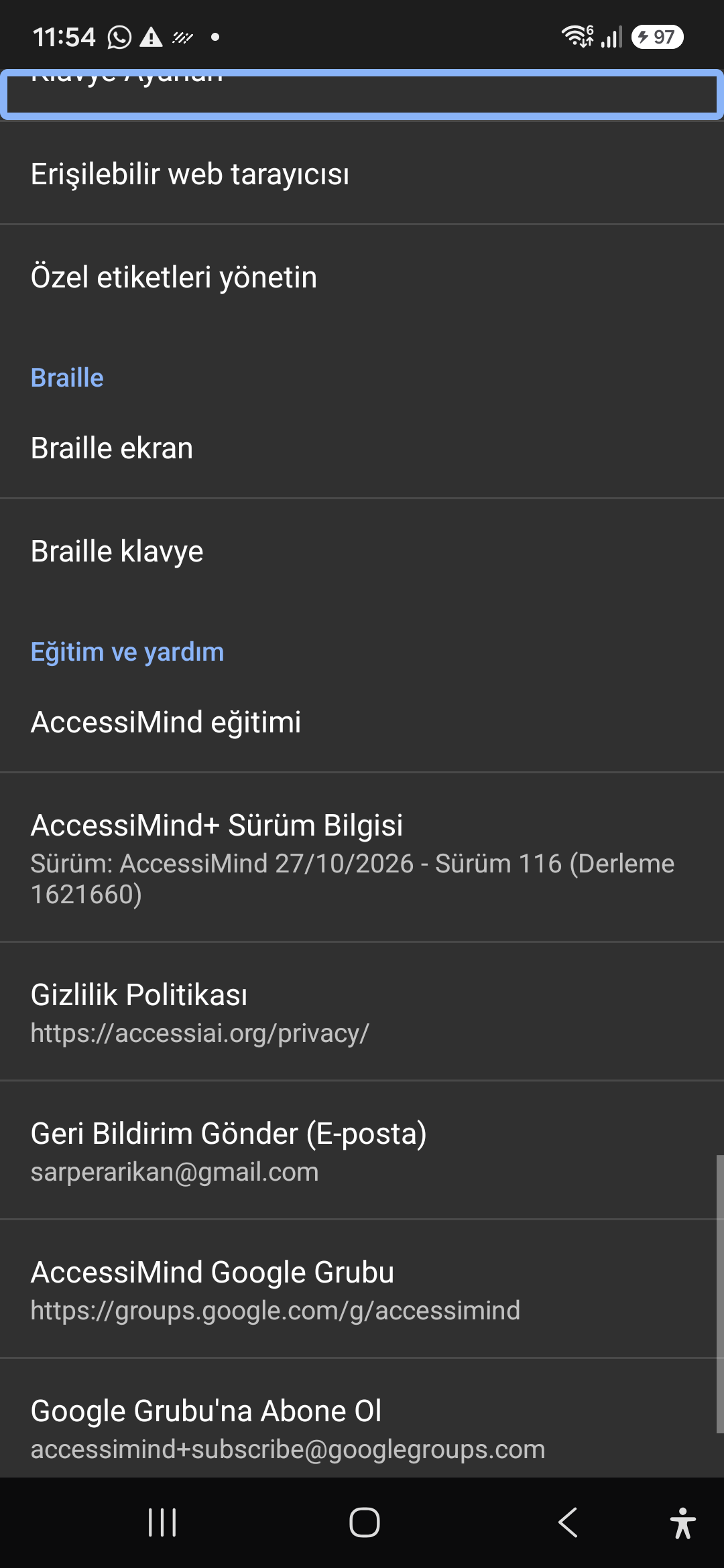
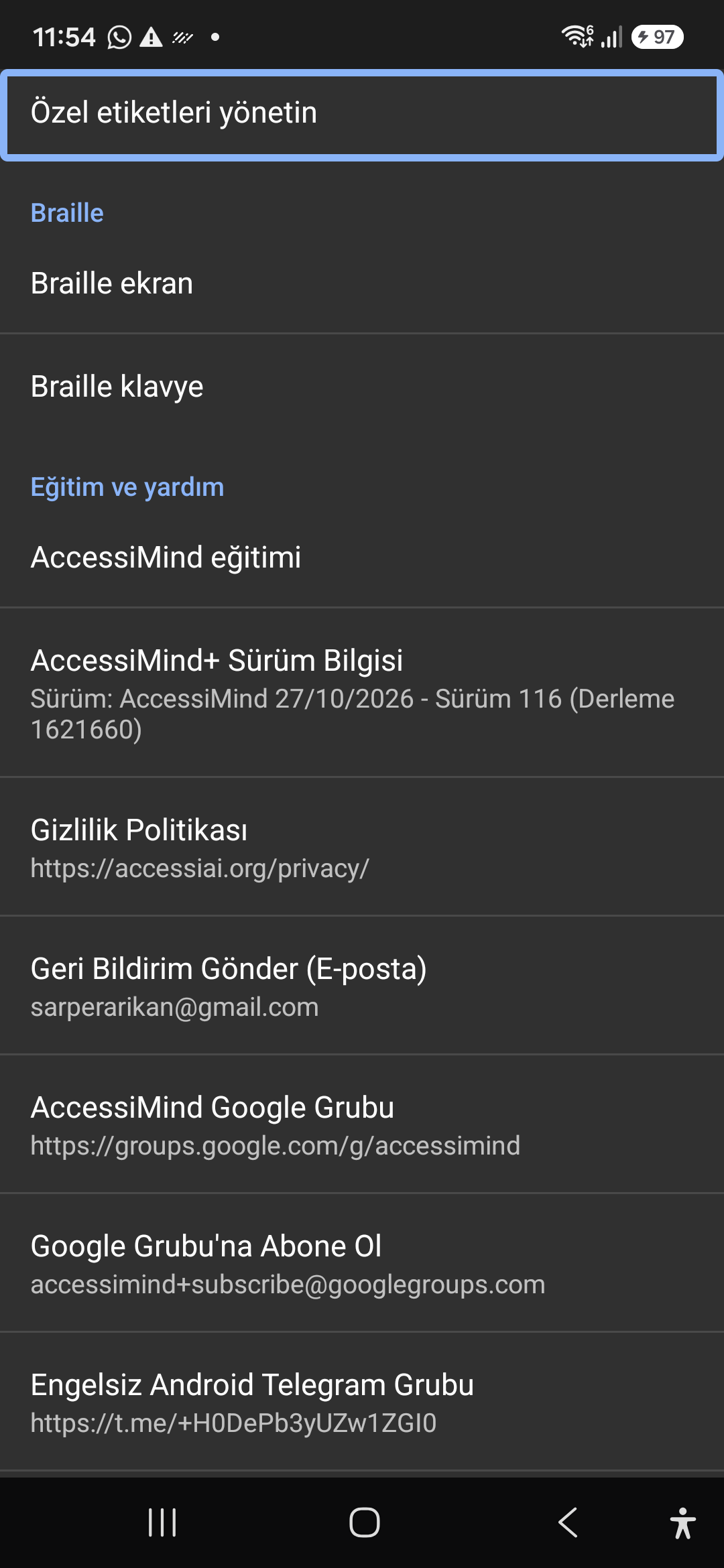
12 / 12 · Settings > Braille / Help & Support > Release 116 Info / Community

12. Braille Support, Release 116 Info & Community Channels

ভিডিওতে এই স্ক্রিন ওয়াকথ্রু দেখুন (01:05 - 01:19)

Connect refreshable Braille displays via Bluetooth or USB. Access Release 116 verification certificates, privacy terms, and direct Telegram/Google Groups.

2026/10-116 স্ক্রীন ওয়াকথ্রু ভিডিও গাইড (01:05 - 01:19)

Braille display and on-screen keyboard support; Release 116 (Build 1621660) metadata, Privacy Policy, Feedback, and active community groups.

Screenshot showing Braille settings, Release 116 version info, and community channels.

12. Braille Support, Release 116 Info & Community Channels — Settings > Braille / Help & Support > Release 116 Info / Community
Settings > Braille / Help & Support > Release 116 Info / Community